
6A.
Technical Infrastructure:
DIGITIZATION CHAIN
Key Concepts
6A.
Digitization Chain
6B. Image Creation
6C. File Management
6D. Delivery
INTRODUCTION
Technical infrastructure refers loosely to the components
that make digital imaging possible. The entire process is sometimes called
the digitization chain, suggesting a series of logically ordered steps.
In actual practice, the digitization chain can have side branches, loops
and recurring steps, but for simplicity's sake, we present it here as
if it were linear.
The
Digitization Chain
The technology necessary to navigate from one end of the digitization chain to the other consists mainly of hardware, software, and networks. That's what this section focuses on. A truly comprehensive view of technical infrastructure also includes protocols and standards, policies and procedures (for workflow, maintenance, security, upgrades, etc.), and the skill levels and job responsibilities of an organization's staff.
However, even the nuts and bolts of the technical infrastructure cannot be evaluated in complete isolation. Related actions and considerations, which will affect decisions about the technical infrastructure, include:·
Technical infrastructure decisions require careful planning because digital imaging technology changes rapidly. The best way to minimize the impact of depreciation and obsolescence is through careful evaluation, and the avoidance of unique, proprietary solutions. If equipment choices are well-matched to intended uses and expected outcomes and synched to realistic timetables, return on investment will be maximized.
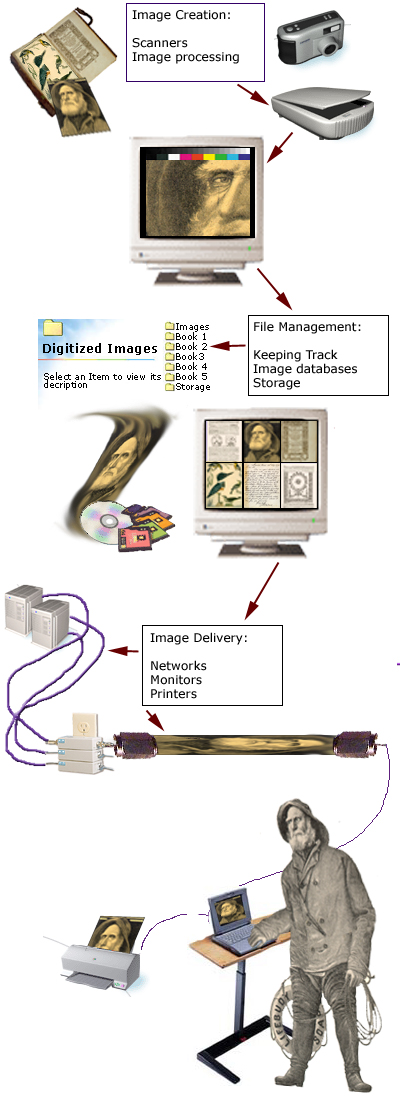
Digitization Chain: Click
on the components of the chain to go to the sections with more information.
revision - add boxes with text to group the elements,
map the image to turn the sections into hot links

© 2000-2001 Cornell University Library / Department of Preservation and Conservation


